ProSeries LCD Keypad User Guide

 |
 |
 |
 |
 |
 |
 |
ProSeries LCD Keypad User Guide |
|
|||||||
|
||||||||
 |
+ User Code |
Launch of the exit delay with slow beeps on the keypad, then accelerated beeps for the last 10 seconds.
All the detectors of the partition to which the keypad is attached are activated (motion sensor and perimeter).
If a badge is used, present it in front of the bottom of the keyboard.
Depending on the configuration, the code/tag may not be necessary (quick arming).
 TUTORIAL
 |
+ User Code |
Launch of the exit delay without keypad beeps.
All perimeter sensors (doors/windows) of the partition to which the keypad is attached are activated.
Only motion sensors (passive infrared) with the "Armed in night mode" option selected are activated.
Depending on the configuration, the code/tag may not be necessary (quick arming).
TUTORIAL
 |
+ User Code |
Launch of the exit delay without keypad beeps.
All perimeter sensors (doors/windows) of the partition to which the keypad is attached are activated.
No motion sensors (passive infrared), including those with the "Armed in night mode" option selected, are activated.
Depending on the configuration, the code/tag may not be necessary (quick arming).
TUTORIAL
| User Code (or badge) |
Disarming the system and silencing sirens/beeps when an alarm is triggered.
A second disarm sequence will be required in the event of a triggered alarm to clear it before the system can be armed again.
Disarming the system within the time set by your installer cancels the alert to the remote monitoring center (30s by default).
 |
+ User Code (or badge) |  |
+ | |
or | |
or | |
Quick arming (arming without a code/badge) must be disabled for this function to operate (configured by your installer).
This increases system security by ending the sequence with the key:
- to arm and leave the premises,
- to secure the perimeter and remain on the premises,
- to arm night mode and stay inside the premises.
Once the system is armed, opening the front door triggers the alarm immediately, without the usual delay for disarming.
In this case, disarming must be done via the Total Connect 2.0 app, a keyfob, or the keypad (in perimeter or night mode).
|
+ User Code + |   |
Activates the chime in the partition (3 beeps on the keypad/siren) in the event of the opening of a perimeter or other detector.
The chime mode setting must be activated in the configuration of the device(s) concerned.
To deactivates :
|
+ User Code + |  |
|
Displays faulty sensors (doors or windows equipped with a sensor and left open) when the system is disarmed.
If no fault is present, the message "ready to arm" is displayed.
|
+ User Code + |  |
X |
Allows you to temporarily control another partition from the keypad. X represents the partition number from 1 to 4.
0 allows return to the partition for which the keypad is programmed.
The keypad can only be switched to an existing programmed partition. Without action on the keypad for 30 seconds, it automatically switches back to its programmed partition.
|
Master Code + |  |
+ Code + Code |
Allows changing the master code (user 02) from the keypad. 4 or 6 digit code depending on keypad programming.
The new code must be entered twice in a row. A series of 2 beeps will confirm that the new code has been taken into account.
|
+ Master Code | |
XX | |
New Code |
Allows you to create or change a user code from the keypad. 4 or 6 digit code depending on keypad programming. XX is the 2-digit user number (03 to 96). A series of 2 beeps will confirm that the addition of the user code was successful. If the user number is already assigned, its code is replaced.
|
+ Master Code + | |
XX | |
|
Delete a user from the system.
The user number, code and associated badge(s) will be erased.
XX is the 2-digit user number (03 to 96).
The wireless remote control associated with the user will no longer be operational.
|
+ User Code + |  |
|
Trigger the detector. The keypad emits 3 beeps confirming correct operation. The triggered zone is displayed on the LCD keypad. Repeat the operation for each detector. For volumetrics, wait at least 3 minutes between 2 detections. Information is transmitted to the remote monitoring center at the start and at the end of the test mode.
To exit test mode:
|
+ User Code + | |
|
|
+ User Code + |  |
|
XXX |
Used to force arming of the system when a detector is faulty by manually excluding it. XXX is the number of the faulty detector (ex: 001). Use the same procedure to re-include the detector.
Exclusion may be automatic depending on the configuration made by your installer.
Use the following process to unbypass the sensor:
|
+ User Code + | |
|
XXX |
  or or  or or  |
The system features three Emergency Panics for 24-hour Fire, Medical / Personal, Police silent or audible, alarms. The Emergency Panic buttons can be used to manually initiate their respective alarms and send their reports to the Central Station. If silent Police alarm is programmed, the system will not broadcast an audible alarm or display the alarm.
|
+ Master Code + | |
XX | |
 present badge |
Allows assigning a badge to a user from the keypad. XX is the 2-digit user number. A series of 2 beeps on the keypad will confirm that the addition of the user badge was successful. If the user number is already used, this badge is added.
|
+ Master Code + | |
XX | |
|
Disables the badge assigned to the user. XX is the 2-digit user number (03 to 96).
|
+ Master Code + | |
Enables remote configuration to allow your installer to perform diagnostics and/or modify your system settings remotely. This allows a faster and more economical intervention.
Remote configuration is only possible when the system is disarmed.
|
+ Master Code + | |
Disables remote configuration. Your installer can no longer change your system settings or perform remote diagnostics.
An intervention is necessary on site in the event of an incident.
|
+ Master Code + |  |
This function activates maintenance mode for 30 minutes. During this period, you can replace the batteries of the devices without transmitting the information of their opening to the monitoring station (tamper alarm). This mode also allows you to initiate the change of the WiFi configuration of the ProBOX control panel, following a change of internet box for example. This change is then done using the Total Connect 2.0 app via the "Setting / Change the device's Wi-Fi network" menu.
To exit maintenance mode, you can:
- Wait until the end of the 30 minutes or
- Disarm the system or
- Enter the following sequence:.
An intervention is necessary on site in the event of an incident.
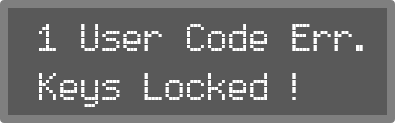 |
In the event of 5 incorrect codes or number keys being pressed successively without including a correct code more than 23 times, all keypads in the system will be locked out for 5 minutes. If the system is connected to a CMS, information is sent indicating the start and end of the lockout. Arming/disarming remains possible via a remote control or Total Connect.